
Save Time and Improve Accuracy: Point Cloud to Revit Model Explained
- February 16, 2026
In the fast-paced world of architecture, engineering, and construction (AEC), time and precision are more critical than ever. Traditional methods of gathering and representing as-built conditions often lead to delays, errors, and increased costs. To address these challenges, point cloud to Revit model technology is transforming workflows by enabling the creation of highly accurate digital models directly from point cloud data. This innovative process enhances collaboration, speeds up project timelines, and significantly reduces errors during the design and construction phases.
What Is a Point Cloud?
At its core, a point cloud is a massive collection of data points in space, typically collected using 3D laser scanning or photogrammetry. Each data point represents a precise measurement from the scanner to a specific point on a surface, creating a detailed and accurate 3D model of the scanned environment. These point clouds contain millions of points, which can represent anything from individual objects to entire buildings or landscapes.
Laser scanning and photogrammetry are the primary methods for capturing this data, each with its unique advantages. Laser scanners use laser beams to measure the distance to surfaces, providing extremely detailed and accurate data. Photogrammetry, on the other hand, uses photographs and software to reconstruct 3D objects and environments from multiple camera angles. Both methods allow for the creation of highly precise point clouds, essential for accurate model generation.
Understanding Revit and BIM (Building Information Modeling)
Revit is a powerful software tool used in the AEC industry to design buildings and infrastructure, primarily through Building Information Modeling (BIM). BIM is a collaborative process that uses digital representations of physical and functional characteristics of buildings to support decision-making throughout their lifecycle.
With Revit, teams can create detailed 3D models, which include both visual data and non-visual information such as materials, structural loads, energy performance, and cost. Revit models serve as the central hub for coordination among architects, engineers, contractors, and facility managers, ensuring everyone is working from the same information and reducing errors.
BIM enhances the efficiency of design and construction by fostering collaboration and facilitating better decision-making. Revit, as the most widely used BIM tool, allows professionals to design, analyze, and simulate various aspects of a building before construction begins.
The Connection: What “Point Cloud to Revit Model” Means
The process of Point Cloud to Revit Model involves transforming raw data from laser scans or photogrammetry into intelligent, editable Revit models. Point clouds serve as the starting point, capturing detailed information about the physical environment, which is then converted into a digital model. This process bridges the gap between as-built conditions (the actual state of a building or structure) and as-designed conditions (the original design specifications).
Transforming point cloud data into digital models enables construction teams to work with a precise, digital representation of the real world, eliminating many of the challenges associated with inaccurate as-built drawings and reducing the risk of errors. By using this technology, teams can improve the accuracy of their designs, collaborate more effectively, and streamline workflows.
Step-by-Step: The Point Cloud to Revit Workflow
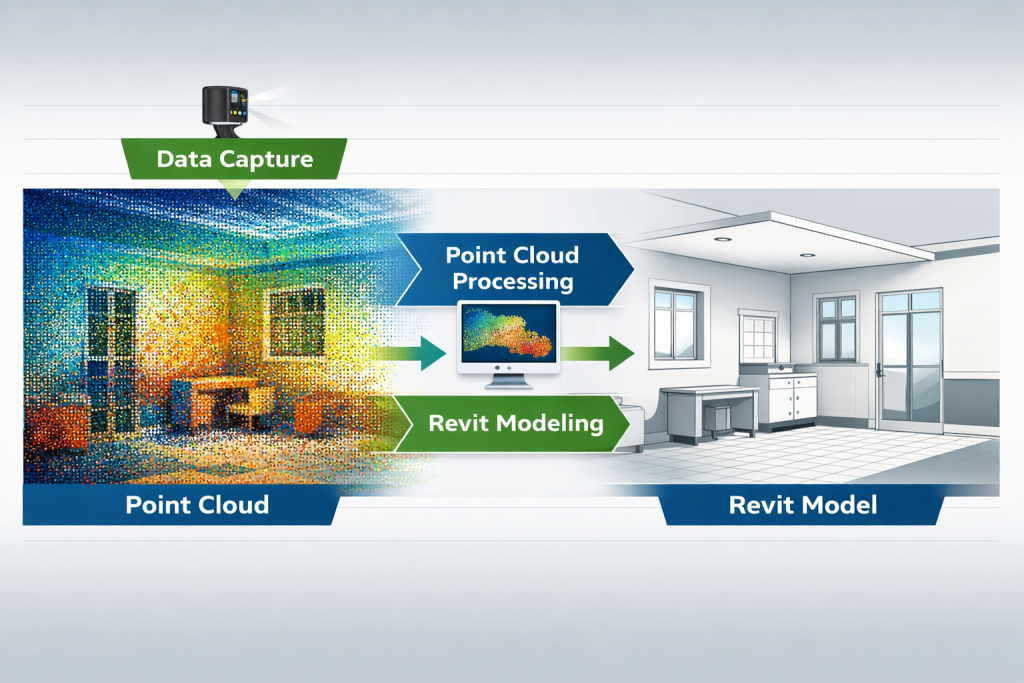
The process of converting point cloud data into a Revit model is multi-faceted, involving several critical steps:
- Collecting Accurate Field Data: The first step is capturing field data through laser scanning or photogrammetry. Laser scanners can capture a building’s exterior and interior with incredible detail, while photogrammetry can be used to scan large environments using drones or handheld cameras. The resulting point cloud data provides a detailed and accurate 3D representation of the scanned area.
- Importing Point Cloud Data into Autodesk Revit: Once the point cloud data is collected, it needs to be imported into Autodesk ReCap — a software designed to process point cloud data. ReCap helps convert the raw scan data into a format that can be used in Revit, providing a smooth transition from raw data to usable 3D models.
- Aligning, Scaling, and Registering the Scan Files: After importing the point cloud data into Revit, it is crucial to align and scale the scan files properly. This step ensures the point cloud accurately represents the physical space and aligns with the coordinate system of the project.
- Modeling Essential Components: Once the point cloud is registered, the design team can begin the modeling process. Key building components, such as walls, windows, and structural elements, are modeled using the point cloud data as a reference. This allows for precise, as-built representations of the existing structure.
- Quality-Checking and Final Validation: The final step is to validate the model against the original point cloud data. This ensures that the Revit model is an accurate digital representation of the scanned environment. Quality checks and clash detection tools can also be used to ensure there are no errors or conflicts in the model before construction begins.
Software and Tools Used in the Conversion Process
Several software tools are essential for the Point Cloud to Revit Model conversion process, including:
- Autodesk ReCap: ReCap is used to process and convert point cloud data into a format that can be imported into Revit. It provides tools for cleaning, aligning, and registering point cloud data, ensuring it can be used effectively for modeling.
- Navisworks: While Navisworks is not directly involved in the point cloud conversion process, it plays a key role in the coordination and visualization of the Revit model. By integrating Revit and point cloud data into Navisworks, teams can perform clash detection and visualize the model in 3D.
- Revit: As the central tool for creating 3D models, Revit is where the point cloud data is converted into an intelligent model. Revit allows users to model building components based on the point cloud and integrate them into the overall design.
By using these tools in combination, teams can streamline the entire process of converting point cloud data into detailed Revit models.
Key Benefits of Point Cloud to Revit Modeling
- Time-Saving: Traditional methods of capturing as-built conditions are time-consuming and prone to human error. With Point Cloud to Revit Model technology, teams can quickly create accurate digital representations of existing structures, reducing the need for manual measurements and drawings.
- Improved Accuracy: Point cloud data provides a highly detailed, accurate representation of the physical environment. This ensures that designs are based on real-world conditions, rather than outdated or inaccurate drawings, resulting in fewer mistakes and rework.
- Enhanced Collaboration: By using a shared Revit model, teams from different disciplines (architects, engineers, contractors) can collaborate more effectively. Changes made by one team member are automatically reflected in the model, reducing the risk of miscommunication.
- Better Visualization: Point cloud data allows teams to visualize the building in 3D, making it easier to identify potential design or construction issues before they arise. This enhanced visualization also helps stakeholders better understand the project and make informed decisions.
Accuracy vs. Efficiency: Striking the Right Balance
While it’s essential to ensure the model is accurate, efficiency is also a key consideration. Point clouds can be incredibly detailed, but this level of detail can result in large file sizes that are difficult to manage. The trick is to find the right balance between data density and model performance.
For example, for large-scale projects, using a lower level of detail may be sufficient for certain aspects of the model. However, critical areas requiring high accuracy, such as structural components or MEP systems, may benefit from a higher level of detail. The decision on the level of detail should be based on the specific requirements of the project.
Real-World Applications and Use Cases
Point Cloud to Revit Modeling has a wide range of real-world applications, including:
- Historical Building Restoration: By scanning and modeling historic buildings, teams can preserve architectural details while updating the building to meet modern standards.
- Renovation and Retrofit Projects: Point cloud data helps create accurate as-built models, which can be used to plan renovations or retrofits of existing structures.
- MEP System Updates: Point cloud data can be used to plan updates to mechanical, electrical, and plumbing systems, ensuring accurate fit and minimizing conflicts during installation.
- Facility Management: Once the building is completed, the Revit model can be used for ongoing facility management, helping teams track maintenance needs, energy performance, and lifecycle costs.
Common Challenges in Converting Point Clouds to Revit Models
Despite its advantages, there are several challenges associated with converting point cloud data into Revit models, including:
- Managing Large Files: High-density point clouds can result in large files, which may require significant processing power and storage capacity.
- Noise and Gaps: Point cloud data may contain noise (unwanted data) or gaps (missing information) that need to be cleaned up before modeling can begin.
- Software Compatibility: Compatibility issues between different software platforms can sometimes complicate the workflow, requiring additional steps to ensure smooth data transfer.
Conclusion: Building Smarter with Revit Models Based on Point Cloud Data
Point Cloud to Revit Modeling is revolutionizing the construction industry, offering unprecedented accuracy, speed, and collaboration. By leveraging digital technology to capture and convert real-world data into intelligent models, construction teams can streamline workflows, reduce errors, and improve project outcomes. Whether you’re working on historical restorations, large-scale renovations, or new builds, this technology is helping to shape the future of construction — smarter, faster, and more accurate than ever before.
Embracing the power of point clouds and Revit models enables construction teams to build with greater confidence, transforming how we design, construct, and manage buildings throughout their lifecycle.